Wednesday, 9 March 2011


First day of shooting
On our first day of filming we had organised ourselves pretty well before hand when it came to things such as picking up the equipment, the time and place we were all meeting etc. We had a production schedule to help us with just that as it allowed us to plan out our day of shooting, that way we knew what time to meet where and when to actually star shooting. Once on set, because it was at one of our group member’s house, the whole group didn’t really have a chance to familiarise themselves with the set before hand apart from photos taken before the filming, therefore as the shooting process began we came to realise that some of the shot we planned were not in reality achievable, and so we had to change them.
At times, especially the third shot with the flicking of the dead girl’s hair we found it quite difficult to shoot, because our actors (mainly me) kept laughing, however in the end we managed to do the scene.
Also we had some technical issues with the camera lights; therefore we had to leave some scene for the second day of filming. Over all however we didn’t have any other issue with the equipment apart from forgetting to focus before some of the shots, because the camera was set on manual. Similarly because of that reason the lighting at times was different but we only realised that once we were back in college, and so had to go out and film once more to make it even everywhere.
All in all our first day of shooting was successful, however we did not manage to finish the whole thing, and so had to come back the next day.

Introduction to editing: SKILLS
USING FINAL CUT PRO
 First open up final cut pro and choose to import files.
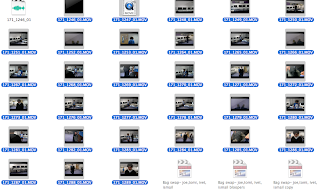
 Now the files will be in final cut pro ready to be added to the time line and edited by cutting or adding effects.
This is an image of the time line.

This is one of the clips being put onto the time line.
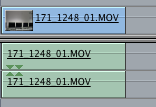
Then the same clip being cut to a shorter amount of time.
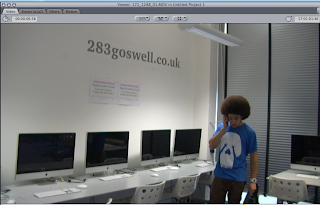 An image of the clip on the viewer box.

Adding text to the movie.


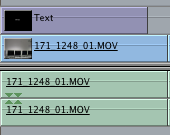
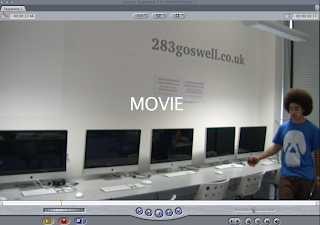
The process of how to add the text to the clip.
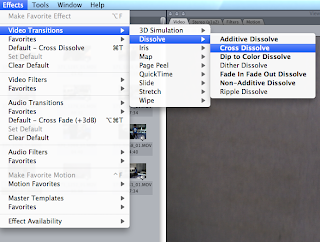
Adding effects to the clip.

 An image of clips used on time line.
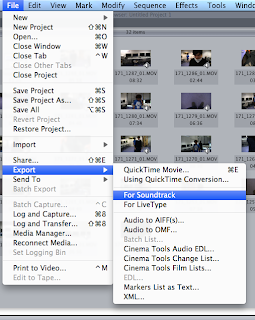
Exporting movie for soundtrack. To add music to the movie.
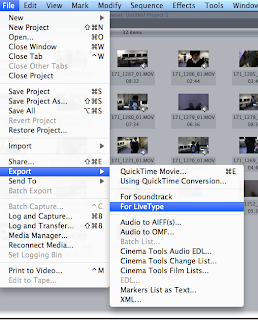
Exporting movie for livetype. To add better text to the movie.


This is an image of the time line.
This is one of the clips being put onto the time line.
Then the same clip being cut to a shorter amount of time.
 An image of the clip on the viewer box.

Adding text to the movie.


The process of how to add the text to the clip.

Adding effects to the clip.

Exporting movie for soundtrack. To add music to the movie.

Exporting movie for livetype. To add better text to the movie.
blog updates
Hi Guys
I really like your new prop ideas, especially the framed photograph as it will create more emotion toward the main characters, drawing in the audience. I hope the filming went well yesterday? Can you meet me on Monday at workshop and we can view your new rushes.
Ismail can you please attend workshop on Monday, (to blog) as you are very behind. Ivet is on target and Tomi and Joe still have some catching up to do.
can you all
add a 'talk to camera' of your filming experience. what did you learn/produce the second time round?
record some of your editing (go to the grey quicktime tab, file and record)
see you Monday
well done
Donna
I really like your new prop ideas, especially the framed photograph as it will create more emotion toward the main characters, drawing in the audience. I hope the filming went well yesterday? Can you meet me on Monday at workshop and we can view your new rushes.
Ismail can you please attend workshop on Monday, (to blog) as you are very behind. Ivet is on target and Tomi and Joe still have some catching up to do.
can you all
add a 'talk to camera' of your filming experience. what did you learn/produce the second time round?
record some of your editing (go to the grey quicktime tab, file and record)
see you Monday
well done
Donna
Tuesday, 8 March 2011
Production Schedule

Before we were allowed to take the equipment we needed out to film, we had to produce a production schedule that had our whole days of filming planned out. That way letting the college know where we would be at what time, and also allowing us to manage our time better once on set.
Monday, 7 March 2011
MoodBoard
I created a moodboard to help us come up with some idea for our thriller..

Close ups of the different sections of the moodboard:
Some themes that could appear in our thriller, and in fact we did use the corps/dead body idea as we have a dead girl in the bed next to the main actor.

Some props that ar offten seen in thrillers such as the knive. In our case we used the lipstick print on the glass from the night before.

Examples of sub genres that thrillers might have eg, psychological wich we used ourselves etc.

Subscribe to:
Posts (Atom)